
This release extends the Barndoor agent governance capabilities across both MCPs and LLMs. For Barndoor MCP Governance, we added tighter controls over which agents are allowed to connect, more precise permissions for tools, and eight new MCPs for Google, Context7, Sardine, and more.
In addition, Barndoor LLM Gateway provides centralized management of LLMs and now, enterprise data protection policies, which extend to MCPs.
Keep reading below!
Barndoor LLM Gateway updates
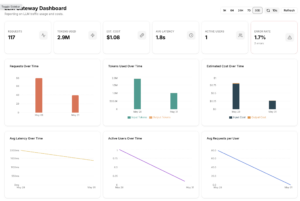
Barndoor LLM Gateway provides centralized management of LLMs and data protection policies, allowing teams to:
- Set access, routing, and usage policy for every provider and model from one dashboard
- Rotate and revoke API keys centrally without touching application code
- Set hard spend caps per user, team, or agents before a call goes out
- Redact, mask, tokenize, or block sensitive data in every prompt before it reaches any provider
- Switch models or add failover providers from the dashboard
- Audit every call logged with cost, latency, and policy actions
Learn more about Barndoor LLM Gateway.
Enterprise data protection for LLMs and MCPs
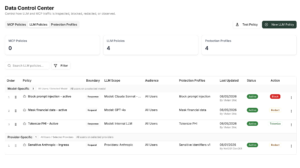
Until now, protecting the data that moves through your AI meant treating MCP tool traffic and LLM model traffic separately. The Barndoor data protection feature now applies across both – what an agent pulls from an external tool through MCPs and the prompts and responses through LLMs. Both can now be governed by data loss prevention policies that prevent agents from reading sensitive data from a connected MCP, or leaking it into an LLM. Learn how Barndoor protects your sensitive data across MCPs and LLMs.
Barndoor MCP Governance updates
New MCPs
We’ve added new MCPs this release, spanning analytics, infrastructure, compliance, and observability:
- Google Analytics: query and analyze web and app analytics directly through your agents
- Google Tag Manager: manage and update tag configurations
- Bamboo HR: allow agents to access HR-related data
- Sardine: give agentic access to fraud and risk data
- Context7: pull library documentation and code directly into agent workflows
Automatic agent registration selection
This feature gives organizations control over whether new agents can be automatically created when connecting through AI clients that support dynamic client registration (DCR).
Previously, when an unrecognized agent (like ChatGPT or another AI client) connected to Barndoor, the platform would automatically create a new agent record for it. This meant any client supporting DCR could register itself without explicit approval, a potential security gap for organizations with strict access policies.
With the toggle ON: an unrecognized agent connects and Barndoor creates a record for it automatically.
With the Toggle OFF: if an unrecognized agent tries to connect to your tenant, the connection is rejected. Only agents that have been pre-registered by an admin are allowed to connect.
ToolIQ Write confirmation enablement control
Before any agent executes a Write operation, an edit, a deletion, or a data creation, Barndoor’s ToolIQ provides visibility to the change it’s about to make and asks for explicit user confirmation to proceed. This human-in-the-loop workflow exists because agents can misinterpret instructions and make mistakes, and native AI clients don’t always show users what’s about to change before it takes action.
Write confirmation can now be configured agent by agent. For agents that you’ve set up to run autonomously, the Write confirmation can be turned off, since there’s no user to respond to a confirmation request. For agents that are operating within a user session, human-in-the loop confirmation can be required.
Tool permissions with CRUD visibility
For enhanced admin convenience, Barndoor-built MCP server tools are now organized into four permission buckets: Create, Read, Update, and Delete (CRUD), making it easier for admins to configure and make more precise decisions about whether an agent should be able to delete a record or update a field versus simply reading it. The move to CRUD makes policy configuration faster and more intuitive. Admins can select Read and enable all tools in that bucket for agents that only need to query data. Or they can go straight to Delete and make sure nothing is enabled there, without having to evaluate each tool individually.
Read/Write for custom servers
MCP specs don’t include a standard way to classify tools by CRUD. For MCP servers in Barndoor’s registry, we’ve built that metadata ourselves, so we know whether each tool creates, reads, updates, or deletes. For MCPs that customers configure themselves, that metadata doesn’t exist and there’s no place to define it.
In order to give admins some control over these custom servers, Barndoor now reads the destructive and read-only hint attributes in the tool’s MCP metadata and uses those to organize these tools into Read and Write buckets, giving admins a meaningful starting point and avoiding the action of allowing all tools or blocking them entirely.
Improved lifecycle management for agents, MCPs, and policies
Managing the full lifecycle of agents, MCPs, and associated policies is a core part of agentic governance. This release improves how Barndoor handles how admins archive and delete these objects.
When deleting an MCP server or AI agent, admins can now see which policies will be impacted before confirming. Impacted policies will either be archived (since they were tied to that agent or MCP server) or updated for those policies that cover multiple agents or servers.
Select multiple groups and roles when setting up policies
Admins can now select multiple groups and roles in a single step when setting up policies, plus ‘search’ function to find them quickly.
Sign up for a demo
Ready to empower your knowledge workers with governed AI at scale? Book a demo or start a free trial to see Barndoor in action.
Note to customers: If any of the features above aren’t visible in your account yet, reach out to your account executive and we’ll get them turned on for you.