
Barndoor Bridge is now generally available on macOS and Windows 11 for Claude Code and Codex. Also in this release: data protection rules per agent, and Barndoor Automations as flowcharts and interactive dashboards.
New in Barndoor AI Gateway
Control access to local MCPs
Barndoor Bridge covers unapproved MCP servers on developer machines. It installs as a desktop app that brings Barndoor’s access control, visibility, and audit to MCP servers running locally on developer machines. Bridge brings Barndoor’s policies and logs to AI tools on dev laptops:
- Per-tool rules for local MCP servers, like allowing reads and blocking deletes.
- An approved server list, pushed to every laptop through MDM.
- One audit trail for local and cloud MCP calls.
- Automatic LLM Gateway setup, with each developer’s approved models, budgets and routing.
Create DLP rules per agent
You can now scope a DLP rule to a specific AI agent and to the user group or role it’s acting for. Before this, a server’s DLP rules applied the same way to every agent that called it. Now, one MCP server can handle data differently depending on which agent is trying to access it and who it’s acting for.
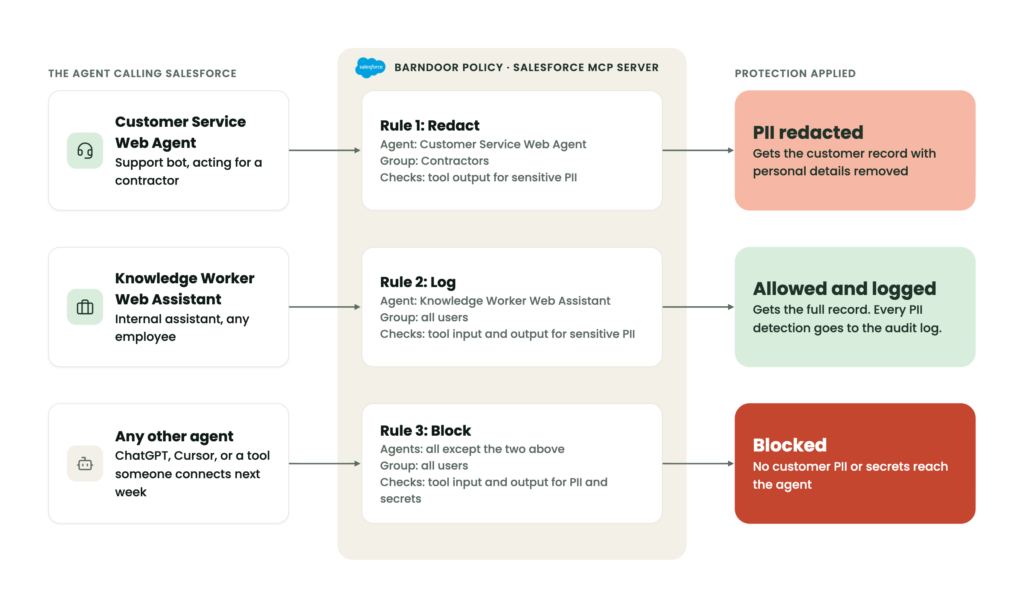
Agents and groups come from the same directory the Access Control Center uses, so you don’t have to set up identities twice. If more than one rule matches a call, Barndoor applies the most restrictive action. Every enforcement decision is tracked in the audit log.
Build groups in Barndoor
Admins can now create user groups directly in Barndoor, add whichever users they want, and use those groups anywhere a group can be used, whether or not their IdP syncs groups over SCIM.
Use native groups to:
- Test a policy on a few users before rolling it out to everyone
- Build groups around Barndoor controls, like a “Premium Model Users” group for a model route that sends those users to top-tier models while everyone else uses lower-cost ones
The new Groups page shows every group in one list, labeled by where it came from: synced over SCIM or created in Barndoor. Click into any group to see its members, and add members to the groups you created in Barndoor.
Barndoor AI Gateway & Automations is on Google Cloud Marketplace
Security and platform teams can now add Barndoor AI Gateway and Automations through the same procurement process they use for Google Cloud.
“Bringing Barndoor to Google Cloud Marketplace will help customers quickly deploy, manage, and grow the company’s AI Gateway and Automations platform on Google Cloud’s trusted, global infrastructure,” said Dai Vu, Managing Director, Marketplace & ISV GTM Programs at Google Cloud. “Barndoor can now securely scale and support enterprises using its platform to help govern AI models, connections and workflows.”
View the Barndoor AI Gateway listing here. Note, you may need to sign in to your Google account to view the listing.
New in Barndoor Automations
Turn code into easy-to-understand flowcharts
Every automation now renders a visual workflow view, in addition to its code. Each step is a card that shows what it does and how it does it: whether it calls a connected tool (like a Jira search or a Smartsheet lookup), uses the model for a judgment call, or runs fixed logic.
You can also see what each step passes to the next. Branches are drawn out too, so you can follow a run from the first fetch to its final outputs at a glance, like a risk analysis and vendor email drafts produced in parallel. The workflow is generated from the same approved Blueprint as the code, so the picture and the code always match.
Turn automations into MCP Apps
Automation results don’t always have to be just raw data. Now you can describe the view you want in one prompt like, “make this into an executive vendor analysis using a dashboard or chart,” and your Barndoor Automation will generate an interactive dashboard that you review and approve before it goes live.
Enterprises can start building governed, production-ready AI automations today. Visit automations.barndoor.ai to sign up and put your first automation to work – start with a Free trial.
Sign up for a demo
Ready to empower your knowledge workers with governed AI at scale? Book a demo or take a product tour to see Barndoor in action.
Note to customers: If any of the features above aren’t visible in your account yet, reach out to your account executive and we’ll get them turned on for you.